Email is the main way that businesses connect to each other. Everything happens via email, including critical documents, internal conversations, and customer messages. A lot of businesses now use hosted email services like Yahoo Mail, Google Workspace, or other cloud-based email platforms. But as companies get bigger, their needs shift. They might require improved protection, more space, or better tools for working together. Many businesses choose to migrate their emails from one cloud platform to another for this reason.
Transferring all of your emails, folders, and attachments from one cloud service to another without erasing any data is known as cloud email migration. If you don't do it right, you could lose emails, folders. In this guide, we'll talk about what cloud email is, why organizations migrate their, and how to safely migrate your data using both manual and professional ways.
What Are Cloud Emails?
Cloud email is when you use the internet to get to email services that are stored on servers that are not in your system. Some examples are Gmail (Google Workspace), Yahoo Business Mail, and other email services that are hosted.
Businesses don't have to run their own servers because everything is stored online. This saves time and money.
There are various reasons why companies migrate their email to a new cloud platform:
No matter what the reason is, the goal is always to migrate all the data safely and not lose anything.
There are two main approaches to migrate cloud email data:
Let's look at both of them.
When you do a manual cloud mail migration, you normally export emails from the old platform and then import them into the new one. You can do this with built-in capabilities like email forwarding, IMAP access, or export tools.
How To Do A Manual Migration?
Problems with manual migration
Because of these issues, manual methods are not good for migrating emails.
Using a professional tool is the best way for Cloud email migration to make it easy and safe. The GainTools Cloud Migration Tool is made to migrate emails and attachments from one cloud platform to another without any errors. It supports all cloud based servers like Gmail, Yahoo Mail, Zoho Mail, etc. It can manage any size of data without facing any errors and downtime. It comes with a free demo version that allows users to check out the software features and functions.
1. Install the software
Get the Tool and install it on your computer. 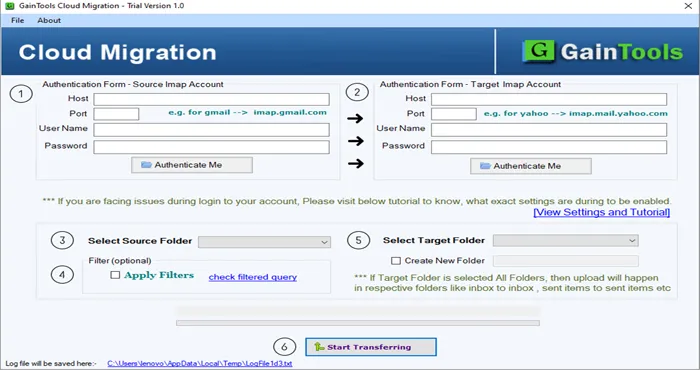
2. Fill up your login information
Give the login information for the cloud accounts you want to use as source and destination. 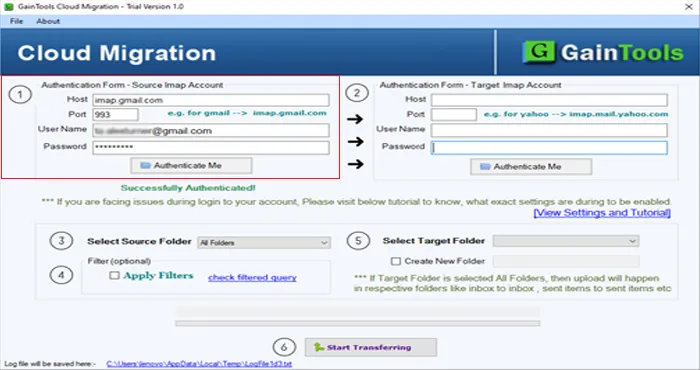
3. Choose the source folder
Pick the folders and files from the source account. 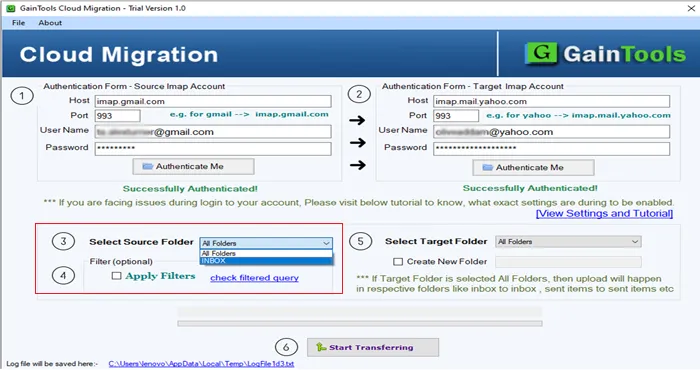
4. Choose the target folder
select the target folder where you want to save the files. 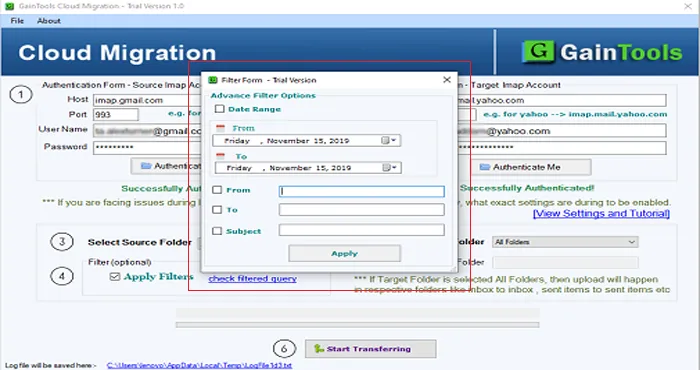
5. Begin the migration
Push the migrate button. The tool safely migrates all of the chosen data to the new cloud platform. 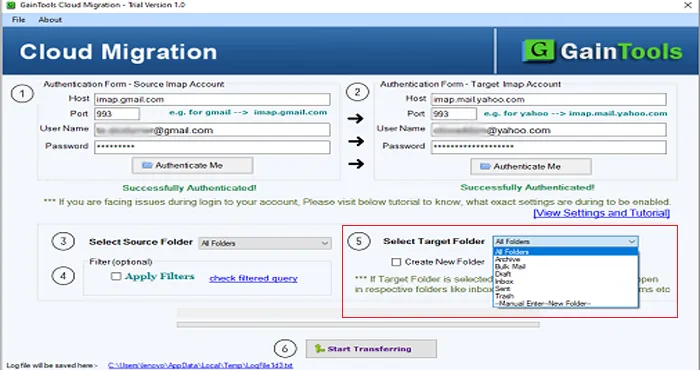
Advantages
This tool is great for companies that want to migrate data quickly, accurately, and without stress.
Many businesses need to migrate their email to the cloud in order to get better performance, security, and features. Manual methods can work for little tasks, but they are dangerous and take a long time. The software is a professional tool that makes sure all of your emails and data are safely migrated from one cloud to another without missing anything. The easiest way to be sure that you don't lose any data and that the process goes smoothly is to use a trusted migration tool.
Questions and Answers
Q1. Will I lose any emails when I migrate to the cloud?
No, your data is safe as long as you use professional tools.
Q2: Is it possible to migrate bulk data at a time?
Yes, software can handle bulk migration.
Q3. Can the tool migrate emails with attachments?
Yes, it can migrate emails with attachments.
Q4: Do you need to know how to use technology?
No, the tool is made for both beginners and experts.
Q5: Can I see emails before they are moved?
Yes, the software lets you see a preview of the data before you move it.